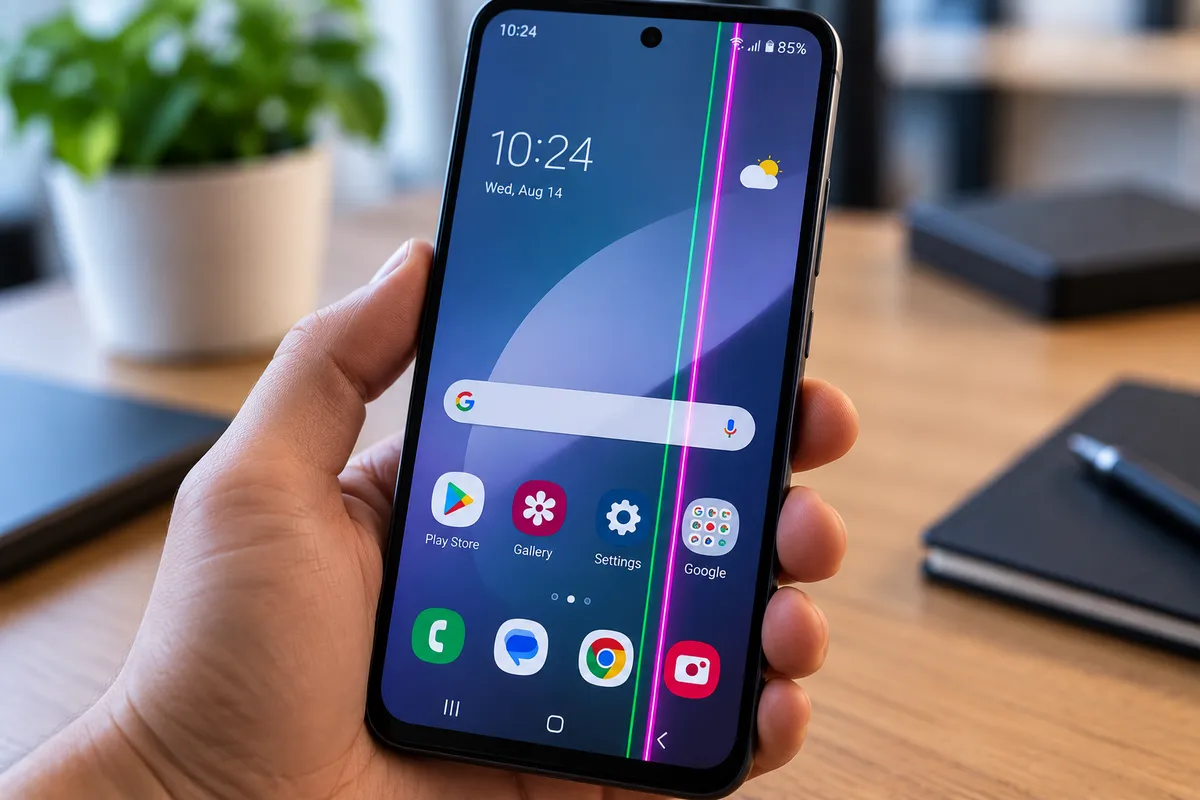
What Causes a Green or Pink Line to Appear on an Android Screen?
A bright green or pink line on an Android screen can appear after a drop, pressure, overheating, or even without an obvious accident. The phone may still turn on and respond to touch, but a line that stays visible across apps and the lock screen usually points to a display-related problem rather than a simple app glitch.
Quick Repair and Electronics provides professional Android phone repair in NYC for screen damage, display faults, charging problems, battery concerns, and other smartphone issues. From our East Village location, we can inspect the device and explain the repair options that fit its condition.
Why Do Green or Pink Lines Appear on Android Screens?
Many Android phones use OLED or AMOLED displays. If part of the panel, an internal connection, or the display control system is damaged, a row or column of pixels can remain stuck in one color. That can create a thin green, pink, white, or purple line across the screen.
The cause depends on the phone and what happened before the line appeared. Impact is common, but heat, pressure, liquid exposure, connector damage, or internal display failure can create similar symptoms.
A Drop Can Damage the Display Even Without Cracking the Glass
One of the most common causes is impact damage. A phone does not need to have shattered glass for the display underneath to be affected. The outer glass may look almost perfect while the OLED panel or its internal connections have been damaged by the force of a drop.
After an impact, one bright line may appear first. Flickering, black spots, touch problems, discoloration, or additional lines can follow. If the line appeared immediately after a drop, physical display damage becomes a strong possibility.
Pressure on the Screen Can Also Damage the Panel
A phone can develop display lines without a major fall. Sitting on the device, carrying it in a tightly packed bag, or pressing heavily on the screen can stress the thin display panel even when the surface glass does not crack.
If the line appeared after the phone was squeezed or bent, the display assembly should be inspected. Continued pressure may cause additional display problems.
Can a Loose Display Connector Cause a Colored Line?
Sometimes the issue involves the connection between the display assembly and the motherboard. A drop or previous repair can disturb a connector or flex cable, causing lines, flickering, or intermittent screen behavior.
Opening a phone to reseat connectors is not a safe first step for most users because modern devices use delicate flex cables, adhesives, and small components. A technician can determine whether the connection or the panel itself has failed.
Can Overheating Cause a Green Line on an Android Phone?
Heat can contribute to display problems, especially when a phone is repeatedly exposed to high temperatures or already has a hardware weakness. Overheating can also stress the battery and internal electronics.
Heat is not automatically the cause, but timing matters. If the line appeared after severe overheating, mention that during diagnosis. The phone should also be checked if it becomes unusually hot for no clear reason.
Can Water Damage Cause Green or Pink Screen Lines?
Yes. Liquid can affect the display connector, internal circuitry, or the display assembly. A phone may keep working after getting wet and develop screen problems later as moisture or corrosion affects connections.
If a colored line appeared after water exposure, avoid repeatedly charging the device just to test it. Liquid-related faults can worsen over time, so an internal inspection may be needed.
Could It Be a Software Problem?
Software can cause unusual display behavior, but a persistent line that stays in the same position is more commonly associated with display hardware. A useful clue is whether it appears during startup, on the lock screen, and across multiple apps.
Restarting the phone is a reasonable test, and legitimate system updates can rule out known software issues. If the line remains unchanged and appears everywhere, hardware diagnosis becomes more important.
Can a Screenshot Help Identify the Problem?
A screenshot can provide a useful clue. If the green or pink line appears on the phone itself but does not appear when that screenshot is viewed on another device, the fault is more likely to be in the physical display or its connection. If the line is captured in the screenshot, software or graphics processing may deserve closer investigation. This is not a complete diagnosis, but it can help distinguish a screen-level problem from an image being generated by the system.
What If the Line Comes and Goes?
An intermittent line should not be ignored. If it appears when the phone is moved, warmed up, or flexed, the problem may involve a damaged panel or unstable connection. Temporary disappearance does not mean the issue has resolved.
Avoid pressing the screen or twisting the phone to make the line go away. That can add stress to the display and may turn a small problem into a larger one.
Can the Screen Still Be Used With One Green or Pink Line?
If the phone still responds normally, you may be able to use it temporarily. However, the screen may later develop flickering, black areas, additional lines, touch problems, or complete display failure.
If important photos, contacts, or files are stored on the phone, back them up while the device is still usable. That is especially important if the display problem is getting worse.
Does a Green or Pink Line Always Mean the Screen Needs Replacement?
Not always. A damaged OLED panel often requires display replacement, but connector problems or other hardware faults can create similar symptoms. Diagnosis helps avoid replacing the wrong part.
A technician can inspect the phone, test the display, review any impact or liquid history, and determine whether the problem is isolated to the screen assembly.
What Should You Do Before Bringing the Phone in for Repair?
Restart the phone and check whether the line remains visible during startup and across different apps. Remove any case that may be putting unusual pressure on the device. If the phone is overheating, let it cool naturally.
Do not press hard on the screen, bend the phone, or try to massage the line away. Avoid opening the device unless you have the proper tools and experience. If the line appeared after a drop or liquid exposure, tell the technician exactly what happened because that history can help narrow down the cause.
Android Screen Repair in NYC
A green or pink line on an Android screen is often a warning that the display or one of its connections has been damaged. The phone may still work, but persistent lines, flickering, black spots, or touch problems should be inspected before the display becomes harder to use.
Quick Repair and Electronics provides Android phone repair in NYC from our East Village location. If your Samsung, Google Pixel, Motorola, or other Android phone develops a green or pink line, our team can inspect the device and explain the repair options based on its model and condition.
For broader smartphone issues, you can also visit our Phone Repair service page for help with cracked screens, battery problems, charging issues, water damage, and other common phone concerns.